
Wealth Path1.8.1 - App Store
You'll be able to see results in few seconds.
Publisher Description
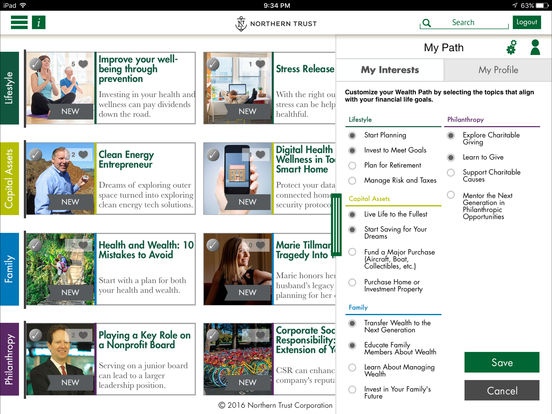
Details:
Your life goals are unique. The path you take to achieve them should be, too. The Wealth Path app provides tailored insights from Northern Trust's experts related to your customized wealth management goals and objectives. You will have instant access to timely insights, relevant commentary and knowledgeable viewpoints on topics of significance to high-net-worth individuals and families.
Benefits:
Gain valuable knowledge to help you maintain your lifestyle today and tomorrow
Pursue your next dream
Invest in the future of the next generation
Protect your family s financial security
Create a philanthropic legacy
Features and Functionality:
Get helpful insights on wealth management topics including investment, trust and estate, tax and philanthropic strategies
Benefit from insights from Northern Trust's experts
Ask a question and our wealth management experts will get back to you with an answer
Share articles with family, friends and associates
Like and recommend relevant articles for other users of the app
Important Information:
There is no charge from Northern Trust to install this app, however, message and data rates may be charged by your communications service provider.
The Northern Trust Company. Member FDIC. Equal Housing Lender.
iPad, iPhone, iPod touch are registered trademarks of Apple, Inc.
Privacy: Northern Trust will not share your Wealth Path registration information with any third party outside of Northern Trust.
Requires iOS 7.0 or later. Compatible with iPad.
About Wealth Path
The company that develops Wealth Path is Northern Trust Corporation. The latest version released by its developer is 1.8.1.
To install Wealth Path on your iOS device, just click the green Continue To App button above to start the installation process. The app is listed on our website since 2013-04-05 and was downloaded 0 times. We have already checked if the download link is safe, however for your own protection we recommend that you scan the downloaded app with your antivirus. Your antivirus may detect the Wealth Path as malware if the download link is broken.
How to install Wealth Path on your iOS device:
- Click on the Continue To App button on our website. This will redirect you to the App Store.
- Once the Wealth Path is shown in the iTunes listing of your iOS device, you can start its download and installation. Tap on the GET button to the right of the app to start downloading it.
- If you are not logged-in the iOS appstore app, you'll be prompted for your your Apple ID and/or password.
- After Wealth Path is downloaded, you'll see an INSTALL button to the right. Tap on it to start the actual installation of the iOS app.
- Once installation is finished you can tap on the OPEN button to start it. Its icon will also be added to your device home screen.
Program Details
System requirements
Download information
Pricing
Version History
version 1.8.1
posted on 2013-04-05
Disclaimer
Official App Store Link
We do not host Wealth Path on our servers. We did not scan it for viruses, adware, spyware or other type of malware. This app is hosted by Apple and passed their terms and conditions to be listed there. We recommend caution when installing it.
The App Store link for Wealth Path is provided to you by apps112.com without any warranties, representations or guarantees of any kind, so access it at your own risk.
If you have questions regarding this particular app contact the publisher directly. For questions about the functionalities of apps112.com contact us.
